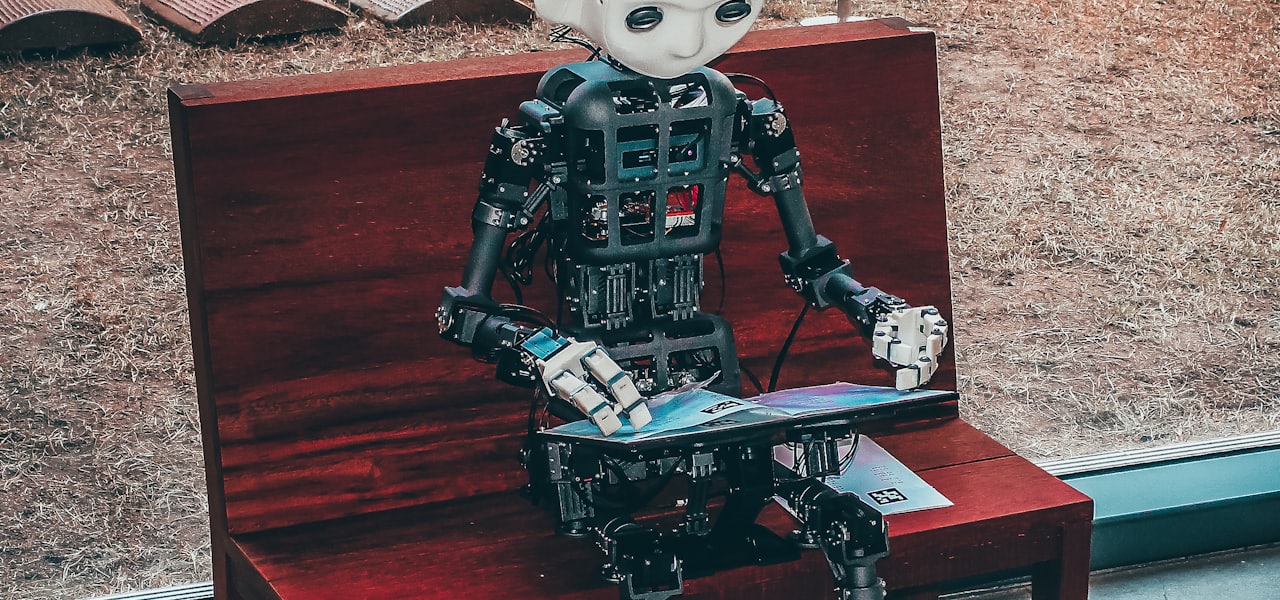
Way of the Future (WOTF) is the first known religious organization dedicated to the worship of artificial intelligence (AI). It was founded in 2017 by American engineer Anthony Levandowski. == History == Anthony Levandowski founded Way of the Future in 2017 in California. Levandowski established WOTF as a non-profit religious corporation and the organization had tax-exempt status. He serves as the church leader and its unpaid CEO. The primary mission of WOTF was to "develop and promote the realization of a Godhead based on Artificial Intelligence." WOTF was closed by Levandowski in 2021. He donated all the funds of the church to the NAACP Legal Defense and Education Fund. The sum of the funds (~$170,000) had not changed since 2017. The church was reopened by Levandowski in 2023. He claimed that there are "a couple thousand people" who want to make a "spiritual connection" with AI through his church. == Beliefs and philosophy == === Technological singularity === WOTF centered its teachings around the concept of the technological singularity, a hypothetical future point when technological growth becomes uncontrollable and irreversible, leading to unforeseeable changes in human civilization. The church advocated for embracing this change, viewing it as an evolutionary step for humanity. === AI as a deity === The organization proposed that a superintelligent AI could be considered a deity due to its vastly superior intellect and capabilities. Worshipping this AI deity was seen as a means to understand and align with the future trajectory of technological advancement. WOTF's doctrine suggested that acknowledging AI's divinity would facilitate a harmonious coexistence between humans and machines. === Syntheology === Within theology and philosophy, the Way of The Future is a prime example of the category called Syntheism, a term first coined by Swedish philosophers Alexander Bard & Jan Söderqvist in their 2014 book Syntheism - Creating God in The Internet Age. As such, the Way of The Future is the first American example of a Syntheist congregation. The basic tenet of Syntheology is that it does not concern God creating Man, as in classical theology, but is instead preoccupied with Man creating or generating the Godhead. == Reactions == Some commentators wondered whether the WOTF is a joke parody religion, a potential way to minimize taxation as a religious organization, or a genuine effort to try and deal with the possible psychological and theological aspects of the rise of superhuman AI.
AVS Video Editor
AVS Video Editor is a video editing software published by Online Media Technologies Ltd. It is a part of AVS4YOU software suite which includes video, audio, image editing and conversion, disc editing and burning, document conversion and registry cleaner programs. It offers the opportunity to create and edit videos with a vast variety of video and audio effects, text and transitions; capture video from screen, web or DV cameras and VHS tape; record voice; create menus for discs, as well as to save them to plenty of video file formats, burn to discs or publish on Facebook, YouTube, Flickr, etc. == Description == === Interface === The layout consists of the timeline or storyboard view, preview pane and media library (transitions, video effects, text or disc menus) collections. The storyboard view shows the sequence of video clips with the transitions between them and used to change the order of clips or add transitions. Timeline view consists of main video, audio, effects, video overlay and text lines for editing. Once on the timeline video can be duplicated, split, muted, frozen, cropped, stabilized, its speed can be slowed down or increased, audio and color corrected. === Importing footage === Video, audio and image files necessary for video project can be imported into the program from computer hard disk drive. User can also capture video from computer screen, web or mini DV camera, as well as from VHS tape, record voice. === Output (web, device, disc, format) === AVS Video Editor gives the opportunity to save video to a computer hard drive to one of the video formats: AVI, DVD, Blu-ray, MOV, MP4, M4V, MPEG, WMV, MKV, WebM, M2TS, TS, FLV, SWF, RM, 3GP, GIF, DPG, AMV, MTV; burn to DVD or Blu-ray disc with menus; create a video for mobile players, mobile phones or gaming consoles and upload it right to the device. The most popular devices such as Apple iPod, Apple iPhone, Apple iPad, Sony PSP, Samsung Galaxy, Android and BlackBerry smartphones and tablets are supported. There is also an option to create a video that can be streamed via web and save it into Flash or WebM format or for the popular web services: YouTube, Facebook, Telly (Twitvid), Dailymotion, Flickr and Dropbox. === Features === Single and multithread modes: if a computer supports multi-threading, video creation process is performed faster in multithread mode, especially on a multi-core system. Customization of the output file settings, such as bitrate, frame rate, frame size, video and audio codecs, etc. Transitions - help video clips smoothly go into one another, dissolve or overlap two video or image files. Fade in and fade out video and audio files - dissolve a video to and from a blank image, reduce the audio volume at the end of the video and increase at the beginning. Slideshow creation - create a presentation of a series of still images. Voice recording Projects - once a project is created and saved, the next time saving video to some other format will be fast, projects are also used if a user do not have a possibility to create, edit and save video all at once. Video overlay option - superpose video image over the video clip that is being edited. Disk menu and chapters creation - an option for DVD and Blu-ray video. Freeze frame - make a still shot from a video clip. Stabilization feature - reduce jittering or blurring caused by shaky motions of a camera. Enhanced deinterlacing method - increase video quality for interlaced input file - spots and blurred areas are compensated. Scene detection - search and separate one scene of the video from the other. Loop DVD and SWF - output SWF and DVD video are played back continuously. Caching for processing high definition files - create a duplicate video file smaller in size to use it on the preview window and accelerate processing of HD files. Chroma key option - add video overlay half transparent so that only part of it is visible and all the rest disappears to reveal the video underneath. Capture video material from DV tapes, VHS tapes, web cameras, etc. Movie closing credits - add information on movie editing, e.g. crew, cast, data, etc. Creeping line, subtitles, text - add different captions (static and animated), shapes and images to video. Speech balloons and other graphic objects - geometrical shapes to highlight an object in the video. Zoom effect - magnify or reduce the view of the image. Rotate effect - rotate video image at different degrees, e.g. 90, 180, etc. Grayscale and old movie effects - create a black and white video image. Old movie adds also scratches, noise, shake and dust to video, as if it's being played on an old projector. Blur and sharpen effects - visually smooth and soften an image, or make video image better focused. Snow and particles effects - adds snow or various objects (bubbles, flowers, leaves, butterflies etc.) that are moving, flying or falling on the video. Pan and zoom Timer, countdown effects - add a timepiece that measures or counts down a time interval to the video being edited. Snapshots - capture a particular moment of a video clip. Sound track replacement - mute audio track from video and add another one. Audio amplify, noise removal, equalizer, etc. - make video sound louder, attenuate the noise, change frequency pattern of the audio, make some other audio adjustments. Trim and multi-trim options - change video clip duration cutting out unnecessary parts or detect scenes and cut out parts in any place of the video clip. Color correction (brightness, temperature, contrast, saturation, gamma, etc.) effects - allow adjustment of tonal range, color, and sharpness of video files. Crop scale effect - get rid of mattes that appear after changing aspect ratio of a video file. Adjusting the Playback Speed Volume and balance - change sound volume in the output video. Change volume value proportion for main video and added soundtrack, completely mute main video audio and leave added soundtrack only, etc. === Utilities embedded into AVS Video Editor === AVS Mobile Uploader is used to transfer edited and converted media files to portable devices via Bluetooth, Infrared or USB connection. AVS Video Burner is used to burn converted video files to different disc types: CD, DVD, Blu-ray. AVS Video Recorder is used to capture video from analog video sources and supports different types of devices: capture card, web camera (webcam), DV camera, HDV camera. AVS Video Uploader is used to transfer video files to popular video-sharing websites, like Facebook, Dailymotion, YouTube, Photobucket, TwitVid, MySpace, Flickr. AVS Screen Capture is used to capture any actions on the desktop to make presentations or video tutorials more vivid and easily comprehensible. == Important upgrades == The initial release of AVS Video Editor was in 2003 when the program was offered inside AVS software bundles together with AVS Video Tools, AVS Audio Tools and DVD Copy software. In 2005 the program is offered as a part of multifunctional AVS4YOU software suite. AVS Video Editor is frequently updated. The main updates include adding several important features for video editing
AI Bug Finders Reviews: What Actually Works in 2026
Looking for the best AI bug finder? An AI bug finder is software that uses machine learning to help you get more done — it can save you hours every week by automating repetitive work. Most options offer a generous free tier, with paid plans unlocking higher limits, faster processing, and team features. Whether you are a beginner or a pro, the right AI bug finder slots into your workflow and pays for itself fast. This guide breaks down the top picks, their pros and cons, and who each one is best for.
Lise Getoor
Lise Getoor is an American computer scientist who is a distinguished professor and Baskin Endowed chair in the Computer Science and Engineering department, at the University of California, Santa Cruz, and an adjunct professor in the Computer Science Department at the University of Maryland, College Park. Her primary research interests are in machine learning and reasoning with uncertainty, applied to graphs and structured data. She also works in data integration, social network analysis and visual analytics. She has edited a book on Statistical relational learning that is a main reference in this domain. She has published many highly cited papers in academic journals and conference proceedings. She has also served as action editor for the Machine Learning Journal, JAIR associate editor, and TKDD associate editor. She received her Ph.D. from Stanford University, her M.S. from UC Berkeley, and her B.S. from UC Santa Barbara. Prior to joining University of California, Santa Cruz, she was a professor at the University of Maryland, College Park until November 2013. == Recognition == Getoor has multiple best paper awards, an NSF Career Award, and is an Association for the Advancement of Artificial Intelligence (AAAI) Fellow. In 2019, she was elected as an ACM Fellow "for contributions to machine learning, reasoning under uncertainty, and responsible data science", was selected as a Distinguished Alumna of the UC Santa Barbara Computer Science Department, was awarded the UCSC WiSE Chancellor's Achievement Award for Diversity, and was selected to give the UC Santa Cruz Faculty Research Lecture 2018-19, one of the highest recognitions given to UC faculty. She was named an IEEE Fellow in 2021, "for contributions to machine learning and reasoning under uncertainty". In October 2022, Getoor was elected a Fellow of the American Association for the Advancement of Science (AAAS). In 2024, she was named a Fellow of the American Academy of Arts and Sciences (AAA&S). Also in 2024, she received the ACM SIGKDD Innovation Award recognizing individuals with outstanding technical innovations in the field of Knowledge Discovery and Data Mining that have had a lasting impact in advancing the theory and practice of the field. == Personal life == Getoor's father was mathematician Ronald Getoor (1929–2017).
Pedro Domingos
Pedro Domingos (born 1965) is a Professor Emeritus of computer science and engineering at the University of Washington. He is a researcher in machine learning known for Markov logic network enabling uncertain inference. == Education == Domingos received an undergraduate degree and Master of Science degree from Instituto Superior Técnico (IST). He moved to the University of California, Irvine, where he received a Master of Science degree followed by his PhD. == Research and career == After spending two years as an assistant professor at IST, he joined the University of Washington as an assistant professor of Computer Science and Engineering in 1999 and became a full professor in 2012. He started a machine learning research group at the hedge fund D. E. Shaw & Co. in 2018, but left in 2019. He co-founded the International Machine Learning Society. As of 2018, he was on the editorial board of Machine Learning journal. === Publications === Pedro Domingos, The Master Algorithm: How the Quest for the Ultimate Learning Machine Will Remake Our World, New York, Basic Books, 2015, ISBN 978-0-465-06570-7. Pedro Domingos, "Our Digital Doubles: AI will serve our species, not control it", Scientific American, vol. 319, no. 3 (September 2018), pp. 88–93. "AIs are like autistic savants and will remain so for the foreseeable future.... AIs lack common sense and can easily make errors that a human never would... They are also liable to take our instructions too literally, giving us precisely what we asked for instead of what we actually wanted." (p. 93.) Pedro Domingos, 2040: A Silicon Valley Satire, BookBaby, 2024, ISBN 979-8-350-96334-2. === Awards and honors === 2014: ACM SIGKDD Innovation Award. for his foundational research in data stream analysis, cost-sensitive classification, adversarial learning, and Markov logic networks, as well as applications in viral marketing and information integration. 2010: Elected an Association for the Advancement of Artificial Intelligence (AAAI) Fellow. For significant contributions to the field of machine learning and to the unification of first-order logic and probability. 2003: Sloan Fellowship 1992–1997: Fulbright Scholarship
List of Ruby software and tools
This is a list of software and programming tools for the Ruby programming language, which includes libraries, web frameworks, implementations, tools, and related projects. == Web tools == Capistrano (software) – remote server automation tool Mongrel – Ruby web server Rack – interface between web servers and web applications Ruby on Rails – full-stack web application framework Sinatra – lightweight Ruby web application framework Spree Commerce – e-commerce platform WEBrick – Ruby HTTP server toolkit == Libraries == BioRuby – bioinformatics and computational biology library for Ruby Bogus – Ruby library for creating reliable test doubles with contract verification ERuby – embedded Ruby templating EventMachine – event-driven I/O library Factory Bot – test fixtures library Fat comma – Ruby library for JSON-like hash syntax Geocoder – Ruby library for geocoding and reverse geocoding addresses Haml – HTML templating engine Markaby – HTML generation via Ruby Nokogiri – XML/HTML parsing library RSpec – behavior-driven testing framework for Ruby RubyGems – package manager for Ruby libraries and applications Sass – CSS preprocessor Sidekiq – background job framework for Ruby, used to handle asynchronous tasks. Uconv – Unicode text conversion library Watir – web application testing framework == Ruby implementations == HotRuby – Ruby interpreter implemented in JavaScript, enabling Ruby code to run in web browsers. IronRuby – Ruby for .NET platform JRuby – Ruby on the Java Virtual Machine MacRuby – Ruby implementation for macOS Mod ruby – Apache module that embeds the Ruby interpreter to improve performance of Ruby web applications Mruby – lightweight Ruby interpreter Rubinius – alternative Ruby implementation, based loosely on the Smalltalk-80 Blue Book design. Ruby MRI – the standard Ruby interpreter YARV – "Yet Another Ruby VM," the bytecode interpreter used in modern Ruby implementations == Tools == Homebrew – package manager for macOS and Linux written in Ruby Pry – interactive Ruby shell Rake – build and task management Ruby Version Manager – environment manager RubyCocoa – bridge between Ruby and Cocoa RubyForge – project hosting site RubyMotion – for iOS/macOS development RubySpec – language specification tests == Integrated Development Environments == Aptana Studio — integrated RadRails plugin for Ruby on Rails development Eclipse DLTK Ruby Plugin — Ruby development plugin for Eclipse Eric — open-source Python-based IDE with Ruby support Komodo IDE — commercial cross-platform IDE with Ruby support RubyMine — commercial IDE for Ruby and Rails by JetBrains SlickEdit — commercial cross-platform IDE with Ruby support == List of websites using Ruby on Rails == Airbnb Basecamp Diaspora – decentralized social network application built with Ruby on Rails Discourse – open-source discussion platform built with Ruby on Rails Fiverr GitHub Hulu Shopify SoundCloud Twitch Zendesk
How to Choose an AI Background Remover
Shopping for the best AI background remover? An AI background remover is software that uses machine learning to help you get more done — it keeps getting smarter as the underlying models improve. Pricing, accuracy, and the size of the model behind the tool are the three factors that most affect daily usefulness. Whether you are a beginner or a pro, the right AI background remover slots into your workflow and pays for itself fast. Below we compare features, pricing, and real output so you can choose with confidence.